Azure Data Factory: A Practical Overview (2026)
By the InfiniSynapse Data Team · Last updated: 2026-07-15 · Authors: data engineers who ship an AI-native analysis platform and regularly review customer pipeline stacks that include Azure. This overview reflects how Azure Data Factory fits a 2026 stack — practitioner guidance, not a Microsoft certification course.
Table of Contents
- TL;DR
- How We Approach It
- What It Is
- Core Concepts
- When to Use It
- Integration Runtimes and Connectivity
- Cost and Operations
- Common Pitfalls
- ADF in the Age of AI
- Readiness Scorecard
- Common Misconceptions
- Frequently Asked Questions
- Conclusion
TL;DR
Direct answer: Azure Data Factory is Microsoft's cloud service for orchestrating data movement and transformation across cloud and on-premises sources. In 2026, Azure Data Factory matters for teams on Azure because it provides managed, code-optional pipelines, but its value depends on using it for orchestration rather than heavy transformation logic it was never designed to hold.
Who this is for: data engineers and leaders evaluating Azure Data Factory in 2026.
What you'll learn: what it is, its core concepts, when to use it, the pitfalls to avoid, and how it fits AI-driven analysis.
This guide sits under the data engineering hub.
For complex transformation patterns, see Azure Data Factory complex transformations.
Also see ETL for data.
How We Approach It
We treat Azure Data Factory as an orchestration service first and a transformation tool second, because that is where teams get value or get stuck. Every observation reflects what we see when Azure teams adopt it well or overload it. We anchor product facts to Microsoft’s official documentation — start with the Azure Data Factory overview on Microsoft Learn — not to unrelated cloud or database product docs.
Official Microsoft references used in this guide:
| Topic | Official docs |
|---|---|
| Product overview | ADF introduction |
| Pipelines & activities | Pipelines and activities |
| Datasets & linked services | Datasets and linked services |
| Integration runtime | Integration runtime |
| Mapping data flows | Mapping data flows |
| Cost planning | Plan to manage costs |
| Monitoring | Monitor with Azure Monitor |
The table below maps the core building blocks of Azure Data Factory.
| Concept | What it is |
|---|---|
| Pipeline | A workflow of activities |
| Activity | A single step (copy, transform, execute) |
| Dataset | A named view of data |
| Linked service | A connection to a source or sink |
| Trigger | What starts a pipeline |
| Integration runtime | Compute that moves data / dispatches activities |
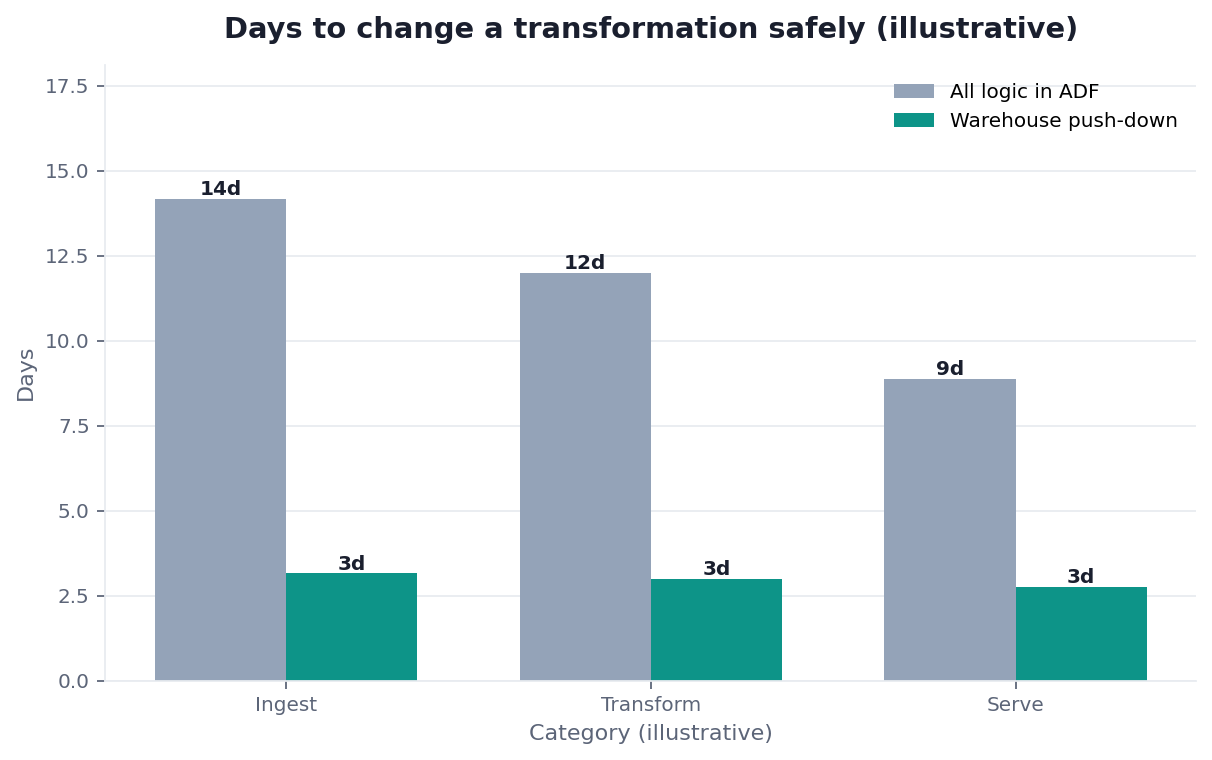
Practical example (composite metrics): a retail analytics team put every business rule inside Azure Data Factory mapping data flows. Median change lead time for a metric fix was 11 days; pipeline JSON diffs were unreviewable. They kept ADF for Copy + orchestration and pushed transforms into Azure Synapse / warehouse SQL (ELT). Lead time fell to 2.5 days; failed activity retries dropped ~40% because pipelines became shorter and easier to retry. Right tool for each job fixed it.
Scope note: This guide reflects patterns we see when mid-market and enterprise teams work with Azure Data Factory in 2026. It is not a substitute for Microsoft’s documentation, Azure support, or a formal architecture assessment — and when a smaller toolset would serve, a full ADF estate is overkill.
What It Is
At its core, Azure Data Factory is a managed cloud service that connects to your data sources, moves data between them, and orchestrates pipeline steps on a schedule or trigger. Microsoft describes it as a fully managed, serverless data integration service for hybrid extract-transform-load (ETL) / extract-load-transform (ELT) patterns — see the official introduction.
Key Definition: Azure Data Factory is Microsoft Azure's managed data integration service that orchestrates and automates the movement and transformation of data across cloud and on-premises sources, using code-optional pipelines built from activities, datasets, and linked services.
The distinction that matters is that Azure Data Factory excels at orchestration and movement, and is adequate but not ideal as the permanent home for complex business transformation. Teams that use it as an orchestrator — coordinating steps while heavy logic lives in a warehouse, Spark, or dedicated transform service — get the most from it.
Core Concepts
Understanding Azure Data Factory means knowing the building blocks Microsoft documents under pipelines and activities and datasets and linked services.
Pipelines and activities
A pipeline is a workflow of activities; each activity is a step such as Copy, Execute Pipeline, or a data-flow transform. Keep pipelines composable: short, named, and retryable. Spaghetti pipelines with dozens of nested transforms are the maintainability trap we see most often.
Datasets, linked services, and triggers
Datasets name the data a pipeline works with; linked services define connections; triggers decide when a pipeline runs (schedule, tumbling window, or event). Together they are why Azure Data Factory can reach many Azure and hybrid sources without you running your own scheduler.
Mapping data flows vs push-down transform
Mapping data flows are useful for visual, Spark-backed transforms inside ADF. Use them for moderate shaping; when logic is dense, version-controlled SQL/Spark in the destination (ELT) is usually easier to test and review. For deeper patterns, see our complex transformation guide.
When to Use It
Choosing Azure Data Factory makes sense when you are on Azure and need managed orchestration of data movement across many sources without running your own Airflow/cluster scheduler. Deep Azure integration and connector breadth are the main reasons to pick it.
| Situation | Prefer ADF to… | Prefer something else when… |
|---|---|---|
| Many SaaS / DB → Azure Lake/Warehouse | Orchestrate Copy + light shape | You need heavy, code-first DAGs only |
| Hybrid on-prem → Azure | Use self-hosted IR (below) | Sources stay local and analysis can federate |
| Complex dimensional models | Orchestrate; transform in warehouse | You try to encode the whole model in data flows |
| Event-driven landing | Event / tumbling triggers | Ultra-low-latency streaming (consider Event Hubs + stream stack) |
It is less compelling when transformation logic is the product. Then Azure Data Factory should orchestrate while heavy lifting happens in the warehouse or Spark — the modern ETL / ELT pattern: load first, transform where compute and testing are natural.
Decision tree (orchestration vs transform home):
Need to move/copy data on a schedule or event?
├─ No → Prefer federation / query-in-place for analysis
└─ Yes → On Azure estate?
          ├─ No → Evaluate your home-cloud orchestrator
          └─ Yes → Is transform logic complex / heavily tested?
                    ├─ No → ADF Copy (+ light data flow) OK
                    └─ Yes → ADF orchestrates; transform in warehouse/Spark
Integration Runtimes and Connectivity
A concept that trips up newcomers is the integration runtime (IR) — the compute that performs data movement and dispatches activities. The Azure IR handles cloud-to-cloud movement; a self-hosted IR reaches data behind a corporate firewall or on-premises.
| Runtime | Typical use |
|---|---|
| Azure IR | Cloud sources/sinks in Azure / public endpoints |
| Self-hosted IR | On-prem SQL, file shares, private networks |
| Azure-SSIS IR | Lift-and-shift existing SSIS packages |
Plan connectivity early — which sources live where, and which IR reaches them — so you do not discover mid-project that on-prem copy needs a self-hosted runtime you never provisioned. Connector breadth is a strength of Azure Data Factory, but it also tempts teams to route every read through pipelines when a federated query would avoid movement for analysis.
Cost and Operations
Running Azure Data Factory well means understanding its cost model. Microsoft documents planning guidance in Plan to manage costs for Azure Data Factory: charges typically involve pipeline orchestration, data movement, and data-flow / IR usage. Costs climb when pipelines run more often than needed or move more data than necessary.
Operational discipline: monitor factories with Azure Monitor, right-size trigger frequency, and avoid full-refresh copies when incremental load works. Teams that treat ADF as “set and forget” are the ones surprised by the bill.
A practical weekly ops checklist we see working: (1) review failed and long-running activities; (2) confirm no accidental daily full loads on large tables; (3) check self-hosted IR node health if you use hybrid copy; (4) spot-check one high-cost pipeline against the cost planning guidance. That rhythm keeps Azure Data Factory spend proportional to the movement that still needs to exist.
Common Pitfalls
The pitfalls with Azure Data Factory are consistent:
- Overloading data flows with complex business logic → unreviewable pipelines.
- Ignoring IR / network design until on-prem copy fails.
- No cost monitoring until the invoice arrives.
- Sprawling pipelines without clear ownership or naming.
- Treating ADF as the whole stack (transform + quality + catalog + orchestration).
Treat Azure Data Factory as the conductor: pair it with a warehouse/Spark engine for heavy compute and with monitoring/alerts for operations. That is how Microsoft’s building blocks are meant to compose — not as a single pane that replaces every other Azure data service.
ADF in the Age of AI
AI is changing how teams think about tools like Azure Data Factory, because an AI-native approach can reduce how many movement pipelines you need by reading across sources directly when consolidation is not required. Where ADF moves data into one place for batch analytics, federation can sometimes analyze it where it lives.
That alternative is the approach we describe in what AI-native data analysis means. In practice, keep Azure Data Factory for the movement that must happen (compliance landing zones, dimensional warehouses, SLA batch loads) while federation handles exploratory analysis that never needed a copy job.
Readiness Scorecard
Assess your Azure Data Factory use (1 point each):
| Check | Pass? |
|---|---|
| We use it mainly for orchestration | |
| Heavy transformation lives elsewhere | |
| Pipelines are clearly structured | |
| IR / connectivity was designed early | |
| We monitor activity runs and failures | |
| Schedules are right-sized for cost | |
| We move only data we need to | |
| Its output is trustworthy for AI |
6–8: healthy use. 3–5: move heavy logic out and monitor cost. Below 3: rethink structure.
Common Misconceptions
Misconception 1: It is a full transformation engine. Azure Data Factory is best as an orchestrator; heavy logic belongs elsewhere.
Misconception 2: It is set-and-forget. Cost and reliability need ongoing monitoring.
Misconception 3: One tool should do everything. ADF is the conductor, not the whole orchestra.
Misconception 4: More pipelines is progress. AI-native federation can reduce how many you need.
Frequently Asked Questions
What is Azure Data Factory?
Azure Data Factory is Microsoft Azure's managed data integration service that orchestrates and automates the movement and transformation of data across cloud and on-premises sources, using code-optional pipelines built from activities, datasets, and linked services. See Microsoft’s introduction. It excels at orchestration and data movement and is best paired with a warehouse or Spark for complex transformation.
What are its core concepts?
The core building blocks are pipelines, activities, datasets, linked services, triggers, and integration runtimes — as documented in Microsoft’s pipeline and dataset concepts. Together they let ADF connect broadly and run on schedules or events.
When should you use it?
Use it when you are on Azure and need managed orchestration of data movement across many sources without running your own scheduler. It is less compelling as the permanent home for complex transformation; orchestrate in ADF and transform where testing and SQL/Spark tooling are stronger.
How do you control its cost?
Follow Microsoft’s cost planning guidance: understand charges for orchestration, movement, and data flows/IR; monitor runs; right-size triggers; prefer incremental loads. “Set and forget” is how bills surprise teams.
How does AI change its role?
An AI-native approach can reduce how many pipelines you need by querying across sources when consolidation is unnecessary. Keep Azure Data Factory for movement that must happen; use federation for analysis that never needed a pipeline.
Conclusion
Azure Data Factory is a managed orchestration service that moves and coordinates data across sources on Azure — most effective as a conductor rather than a transformation engine. In 2026, use it for orchestration, keep heavy logic in the warehouse or Spark, design integration runtimes early, monitor cost with Azure Monitor, and remember federation can reduce how many movement pipelines you need at all.
To see how federated analysis can reduce unnecessary movement pipelines, read what AI-native data analysis means. If you want to try that model in practice, the InfiniSynapse web app is free on registration.