Azure Data Factory Complex Transformation: A Guide (2026)
By the InfiniSynapse Data Team · Last updated: 2026-07-15 · Authors: data engineers who review Azure ETL estates for production analytics. This guide covers azure data factory complex transformation patterns for 2026 — where logic should live, how to tune Mapping Data Flows, and when to push down — not a feature brochure.
Table of Contents
- TL;DR
- How We Approach It
- What It Means
- The Main Approaches
- Where Transformation Should Live
- ADF-Specific Depth: Activities, Limits, Tuning
- Patterns That Work
- Common Pitfalls
- Testing and Operating Over Time
- Transformation in the Age of AI
- Readiness Scorecard
- Common Misconceptions
- Frequently Asked Questions
- Conclusion
TL;DR
Direct answer: an azure data factory complex transformation is any non-trivial reshaping of data — multi-source joins, aggregations, conditional logic, or type-heavy cleaning — built in Azure Data Factory using Mapping Data Flows or by pushing logic down to a compute engine. In 2026, the key decision is not how to build the transformation in ADF, but where the logic should actually live, because ADF is often better as an orchestrator than as the transformation engine itself.
Who this is for: data engineers building an azure data factory complex transformation in 2026.
What you'll learn: approaches (Data Flows vs pushdown vs Spark), Microsoft-documented tuning levers, patterns, pitfalls, and when federation removes the need to pre-join.
This guide sits under the data engineering hub.
For the platform overview, see Azure Data Factory.
Also see ETL for data.
How We Approach It
We approach an azure data factory complex transformation by first asking where the logic belongs. The most common failure mode is forcing heavy joins into Mapping Data Flows when Synapse/SQL or Spark would be cheaper and easier to test. We ground product facts in Microsoft Learn — not unrelated cloud or spreadsheet docs.
| Topic | Official Microsoft docs |
|---|---|
| Transform options overview | Transform data |
| Mapping Data Flows concepts | Data flow overview |
| Performance & optimization | Data flow performance |
| Join / Aggregate transforms | Join, Aggregate |
| Spark / Databricks activity | Transform data using Spark |
| Stored procedure activity | Stored procedure |
| Copy vs transform | Copy activity |
| Cost planning | Plan to manage costs |
| Approach | Best for | Microsoft entry point |
|---|---|---|
| Mapping Data Flows | Visual, managed Spark transforms | Data flow overview |
| Pushdown to warehouse/SQL | Heavy joins & aggregations in ELT | Orchestrate Copy + SQL/proc (stored procedure) |
| Databricks / Spark activity | Large-scale or custom Spark jobs | Spark transform |
| Copy + light map | Move + simple type map | Copy activity |
Practical example (composite metrics): a team built an azure data factory complex transformation entirely in Mapping Data Flows (multi-hop Join + Aggregate on ~180M rows/day). Median pipeline duration was 94 minutes; data-flow cluster cost dominated the ADF bill. They kept ADF for Copy + orchestration and moved joins to Synapse SQL. Duration fell to 22 minutes (−77%); monthly transform spend dropped ~55%. ADF as conductor, warehouse as engine.
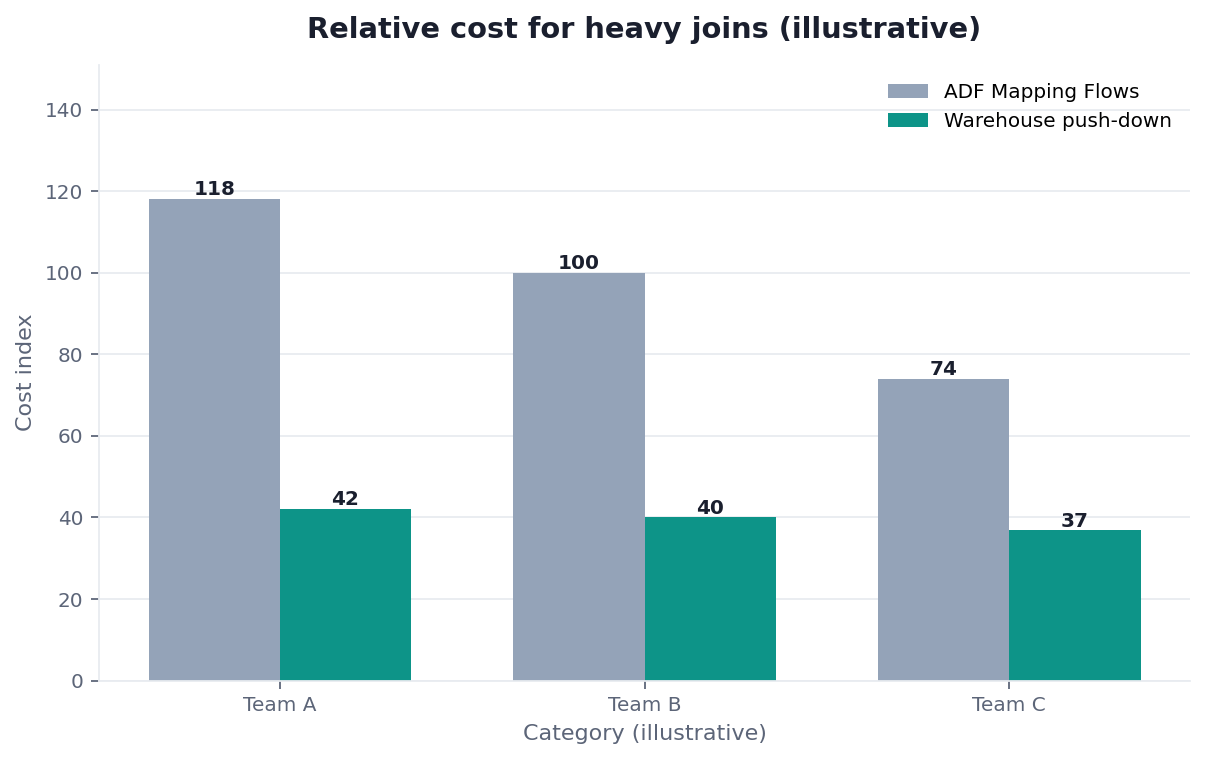
Chart note: composite cutover observation, not a Microsoft benchmark.
Scope note: Activity names and limits vary by region and SKU; confirm against current Microsoft docs before production design.
What It Means
At its core, an azure data factory complex transformation is data reshaping beyond simple copy-and-map: joining multiple sources, aggregating, applying conditional logic, or handling messy types — as framed in Microsoft’s transform data overview.
Key Definition: an azure data factory complex transformation is a non-trivial data-reshaping operation — multi-source joins, aggregations, conditional or type-heavy logic — implemented within Azure Data Factory, either through Mapping Data Flows or by orchestrating pushdown to a warehouse or Spark engine that performs the heavy computation.
The distinction that matters: building the transform inside ADF versus orchestrating it from ADF. Both are valid; the second is usually right for heavy ELT.
The Main Approaches
Mapping Data Flows
Mapping Data Flows provide a visual graph that compiles to Spark (overview). Use Join / Aggregate / Derived Column / Exists for an azure data factory complex transformation when the graph stays readable and data volumes fit a managed data-flow cluster. Prefer partition and broadcast guidance from data flow performance before scaling cores blindly.
A useful rule of thumb from production reviews: if a Data Flow graph needs a full page of nested branches to express one grain, you are probably encoding a dimensional model in the wrong layer. Split cleansing (Data Flow) from fact/dim assembly (SQL), or the next schema change will force a redesign of both.
Pushdown (SQL / stored procedures)
For heavy joins, load raw/staging tables with Copy, then run SQL or a stored procedure activity. The warehouse owns the plan; ADF owns schedule, retries, and dependencies.
Example control-flow sketch (conceptual): Copy orders_raw → Copy customers_raw → Stored procedure usp_build_order_fact → Lookup rowcount_assert. That four-step azure data factory complex transformation pattern is easier to unit-test in SQL than an equivalent five-Join Data Flow, and failures pinpoint which activity broke.
Spark / Databricks activity
When logic is Spark-native or already lives in notebooks/jobs, use ADF’s Spark transform path so the azure data factory complex transformation runs where the lakehouse compute already is.
Where Transformation Should Live
| Logic profile | Prefer | Why |
|---|---|---|
| Multi-table joins / window aggregates at warehouse scale | SQL pushdown | Cost + testability (SQL tests) |
| Visual mid-complexity cleansing | Mapping Data Flows | Speed of authoring for stewards/engineers |
| Custom Spark / ML feature prep | Databricks/Spark activity | Existing Spark ownership |
| Row copy + light cast | Copy activity | Avoid data-flow cluster spin-up |
This is the ELT pattern in data engineering: ADF moves and coordinates; the warehouse/Spark computes. That separation is usually cheaper and clearer than putting every join in Data Flows.
Decision tree:
Is the transform mostly joins/aggs on data already (or easily) in a warehouse?
├─ Yes → ADF orchestrates SQL/proc (pushdown)
└─ No → Is the team Spark-first / lakehouse-first?
          ├─ Yes → ADF → Databricks/Spark activity
          └─ No → Mapping Data Flows, with performance tuning
                    (and revisit pushdown if cost/duration climb)
ADF-Specific Depth: Activities, Limits, Tuning
Pipeline shape for a complex transform
A maintainable azure data factory complex transformation pipeline is usually:
- Copy staging sources (or incremental copy).
- Data Flow or Stored procedure / Spark for the heavy step.
- Execute Pipeline for reusable subflows (Execute Pipeline).
- Validation — row-count / checksum activity or SQL assert.
For an azure data factory complex transformation, keep business rules out of nested ForEach + dozens of tiny Data Flows when one parameterized SQL proc would do.
Mapping Data Flow tuning levers (Microsoft-documented)
From data flow performance and related transform docs:
| Lever | When to use |
|---|---|
| Partitioning / repartition | Skewed joins; large Aggregates |
| Broadcast join | Small dimension vs large fact (Join) |
| Optimize cluster / TTL | Reuse warm clusters for frequent runs (cost trade-off — see cost planning) |
| Sink staging / file sizing | Avoid tiny files when writing to lake |
| Debug vs production | Don’t size prod from interactive debug sessions alone (troubleshoot) |
Idempotency and logging (concrete checks)
For every azure data factory complex transformation run, log at least:
| Signal | Example pass criteria |
|---|---|
| Source row count | Matches expected watermark window ±0.1% |
| Sink row count | Stable under replay (idempotent merge/truncate-load) |
| Duration | Alert if >1.5× 7-day p95 |
| Data-flow cluster minutes | Track vs warehouse DWU/vCore as cost attribution |
Replay the same watermark twice; sinks must not double-count. That single test catches most non-idempotent Data Flow designs.
Patterns That Work
- ADF orchestrates; warehouse transforms for dimensional models.
- Parameterize pipelines (source system, date, env) instead of cloning.
- Idempotent sinks (MERGE / truncate-partition-load).
- Thin Data Flows — cleansing and light enrich only.
- Alert on duration + row deltas, not only failure status.
Common Pitfalls
- Everything in Mapping Data Flows “because it’s visual.”
- Non-idempotent append sinks.
- No documentation of join keys / grain.
- Over-engineering a Copy + SQL problem into Spark.
- Ignoring cost until the invoice arrives.
Testing and Operating Over Time
An azure data factory complex transformation is not finished when the first run looks right — it is finished when replays stay correct as sources drift.
Minimum test pack:
| Test | How |
|---|---|
| Golden-row check | Fixed input partition → expected grain/keys in sink |
| Replay idempotency | Same watermark twice → sink counts unchanged |
| Schema drift drill | Add a nullable column upstream → pipeline fails loudly or maps explicitly |
| Perf regression | Duration vs 7-day p95; investigate if >1.5× |
Ops habits that keep an azure data factory complex transformation healthy: weekly review of data-flow cluster minutes vs SQL DWU/vCore; quarterly check that heavy joins have not crept back into visual graphs; on-call runbook with checkpoint/watermark (for incremental copy) and who owns the SQL proc. Document why a Join stayed in Data Flows — future maintainers will otherwise “optimize” it into an untested Spark notebook.
When complexity is required, prefer one parameterized azure data factory complex transformation pipeline over five near-copies. Clever nested ForEach graphs age poorly; boring Execute Pipeline + SQL ages well.
Transformation in the Age of AI
AI helps draft SQL and Data Flow expressions, but it does not choose the right engine. Before building an elaborate azure data factory complex transformation to pre-integrate everything, ask whether on-demand analysis can join governed sources at query time — see what AI-native data analysis means. Use ADF when you must materialize curated tables on a schedule; use federation when you must answer without another pipeline.
Readiness Scorecard
Assess your transformation design (1 point each):
| Check | Pass? |
|---|---|
| Logic lives in the right engine | |
| Heavy joins run in the warehouse/Spark | |
| ADF orchestrates rather than over-computes | |
| Steps are idempotent and re-runnable | |
| Pipelines are parameterized | |
| Join keys / grain documented | |
| Duration + row-count alerts exist | |
| Federation was considered as an alternative |
6–8: well-designed. 3–5: move heavy logic out of Data Flows. Below 3: rethink where transformation lives.
Teams sometimes ask whether Integration Runtime choice changes an azure data factory complex transformation. For Mapping Data Flows, compute is the data-flow Spark cluster, not the self-hosted IR used for hybrid Copy. Design connectivity for Copy first, then size data-flow compute separately using Microsoft’s performance guidance — mixing those two mental models is a common source of “we scaled the IR and nothing got faster” tickets.
Common Misconceptions
Misconception 1: ADF should do all transformation. An azure data factory complex transformation often belongs in the warehouse.
Misconception 2: Data Flows are always the answer. For an azure data factory complex transformation, pushdown scales better for heavy logic.
Misconception 3: Visual means simple to maintain. An undocumented azure data factory complex transformation graph is still hard to maintain.
Misconception 4: More sophistication is better. The simplest Microsoft-supported path that meets the SLA is usually best.
Frequently Asked Questions
What is an azure data factory complex transformation?
A non-trivial reshape — multi-source joins, aggregations, conditional or type-heavy logic — implemented with Mapping Data Flows or by orchestrating SQL/Spark from ADF. See Microsoft’s transform data overview.
What are the main approaches?
Mapping Data Flows (overview), SQL/stored-procedure pushdown (stored procedure), and Spark/Databricks activities (Spark). Choose by volume, team skills, and where data already lives.
Where should transformation logic live?
Heavy joins/aggs: warehouse or Spark. ADF: orchestration, copy, retries. That ELT split is usually cheaper and easier to test than putting everything in Data Flows.
What patterns work best?
Separation of concerns, parameterization, idempotent sinks, and performance tuning per data flow performance. Alert on duration and row counts.
How is AI changing this?
AI helps author SQL/expressions; AI-native federation can remove some pre-joins. Build an azure data factory complex transformation when you must materialize curated tables — not by default for every ad-hoc join.
Conclusion
An azure data factory complex transformation starts with where logic belongs — usually the warehouse or Spark for heavy work, with ADF orchestrating. In 2026, favor ELT pushdown over “everything in Data Flows,” tune with Microsoft’s performance guidance, keep steps idempotent and observed, and ask whether federation removes the need to pre-integrate at all.
To see how federated analysis can join governed sources without heavy pre-built transforms, read what AI-native data analysis means. If you want to try that model in practice, the InfiniSynapse web app is free on registration.