Databricks Delta Streaming for Real-Time Data Processing
By the InfiniSynapse Data Team · Last updated: 2026-07-15 · Authors: data engineers who operate lakehouse streaming jobs in production. This guide explains databricks delta streaming for real-time data processing in practical 2026 terms — decision framework + implementation patterns, not a product brochure.
Table of Contents
- TL;DR
- How We Approach It
- What It Is
- How It Works
- Minimal Config Example
- When to Use It
- Patterns That Work
- Common Pitfalls
- Real-Time in the Age of AI
- Readiness Scorecard
- Common Misconceptions
- Frequently Asked Questions
- Conclusion
TL;DR
Direct answer: databricks delta streaming for real-time data processing combines Delta Lake tables with Structured Streaming to process data incrementally as it arrives, giving near-real-time results with the reliability of a transactional table. In 2026, it is a strong choice when you genuinely need low-latency data, but many teams reach for streaming when a scheduled batch job would serve them better and cost far less.
Who this is for: data engineers evaluating databricks delta streaming for real-time data processing in 2026.
What you'll learn: how it works (with code), when it fits, medallion patterns, pitfalls, and when AI-native query-in-place is a better answer.
This guide sits under the data engineering hub.
For orchestration context, see data orchestration.
Also see data pipeline architecture.
How We Approach It
We approach databricks delta streaming for real-time data processing as a tool for a specific latency need, not a default. Recommendations reflect jobs we have watched succeed — and jobs that became expensive continuous cost for hourly dashboards. We anchor mechanics to official docs:
| Topic | Authoritative reference |
|---|---|
| Delta + Structured Streaming | Databricks: Stream from/to Delta |
| Delta streaming semantics | Delta Lake: Streaming |
| Structured Streaming concepts | Spark Structured Streaming guide |
| Production checklist | Databricks: Production considerations |
| Medallion layers | Databricks: Medallion architecture |
| Small files / file sizing | Databricks: Tune file size |
Terminology map (so citations stay aligned):
| Term | Meaning in this stack |
|---|---|
| Delta Lake | Transactional table format (transaction log + data files) |
| Structured Streaming | Spark’s incremental micro-batch / continuous processing engine |
| Checkpoint | Durable progress store for exactly-once recovery |
| Trigger | How often a micro-batch runs (ProcessingTime, AvailableNow, …) |
| Sink | Destination table/stream (often another Delta table) |
Practical example (composite): a team stood up databricks delta streaming for real-time data processing for a dashboard reviewed hourly. Moving to a scheduled batch job cut cluster cost ~70% with no user-visible change — the latency requirement was never real-time. Streaming is not free; continuous compute must buy a real decision window.
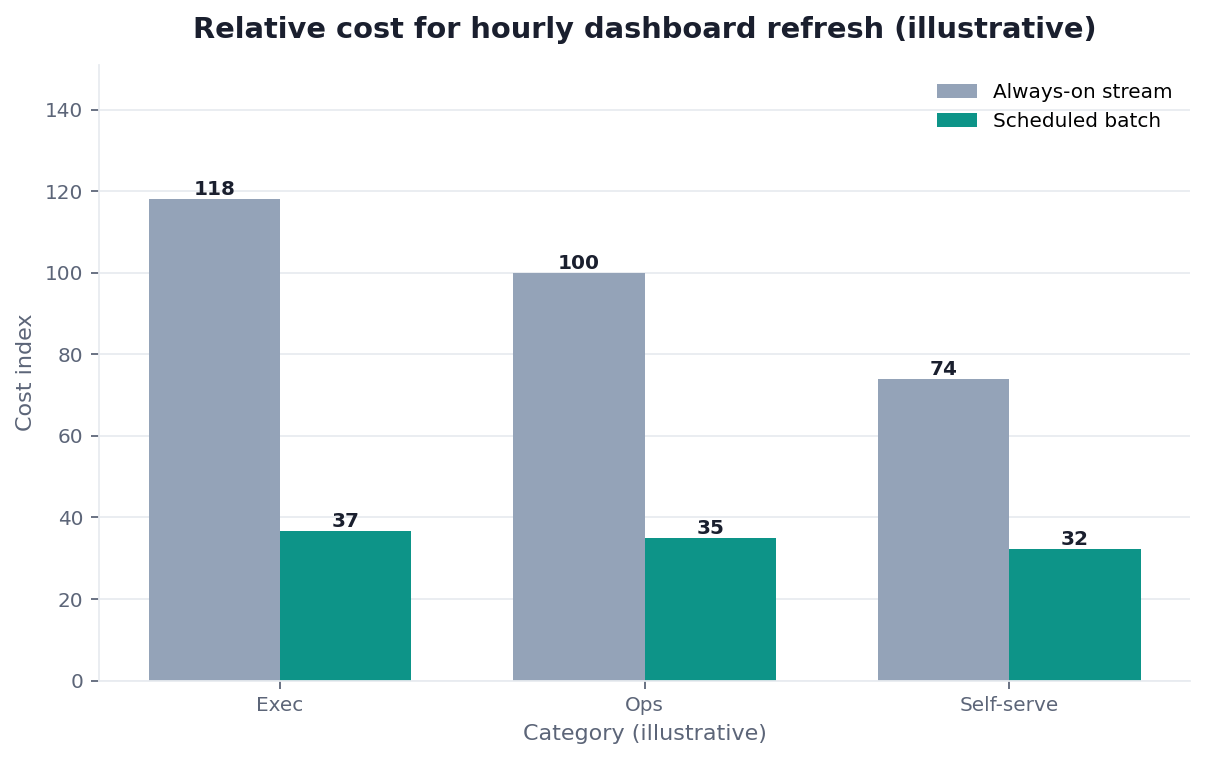
Chart note: composite cost index from an anonymized cutover, not a vendor benchmark.
Scope note: Examples use PySpark APIs common on Databricks Runtime. Confirm options against your DBR version in the official docs above.
What It Is
At its core, databricks delta streaming for real-time data processing pairs Delta Lake’s transactional tables with Structured Streaming’s incremental engine so data is processed as it arrives rather than only in large scheduled batches. See Databricks’ Delta streaming overview and Delta Lake’s streaming documentation.
Key Definition: databricks delta streaming for real-time data processing is the use of Databricks Structured Streaming reading from and writing to Delta Lake tables so that data is processed incrementally and continuously, delivering near-real-time results with Delta’s transactional guarantees — atomic commits, consistent reads, and recoverable progress via checkpoints.
The value is combining latency with reliability. Delta’s transaction log plus Structured Streaming checkpoints are what make recovery and idempotent sinks practical — the failure modes called out in Spark’s Structured Streaming guide (exactly-once sinks, fault tolerance) are the reason teams pick Delta over “append Parquet and hope.”
How It Works
Mechanics for databricks delta streaming for real-time data processing:
- Source: read a Delta table (or stream) as a streaming source.
- Incremental plan: Structured Streaming processes only new data since the last successful micro-batch.
- Checkpoint: progress is written to durable storage (DBFS/UC volume/S3 path you control).
- Sink: write to another Delta table with a supported output mode (
append/complete/updatedepending on the query).
If a job fails and restarts, the checkpoint + Delta commit log let it resume without reinventing offsets by hand — see production considerations.
Kafka / Auto Loader / upstream Delta
            │
            ▼
   Bronze Delta (raw)  ──stream──►  Silver Delta (clean)
                                      │
                                      └──stream──►  Gold Delta (aggregates)
Minimal Config Example
A common bronze→silver path for databricks delta streaming for real-time data processing looks like this (PySpark on Databricks):
from pyspark.sql import SparkSession
from pyspark.sql.functions import col, current_timestamp

spark = SparkSession.builder.getOrCreate()

checkpoint = "/Volumes/ops/checkpoints/orders_bronze_to_silver"
bronze = "main.ops.orders_bronze"
silver = "main.ops.orders_silver"

(
    spark.readStream.format("delta")
    .table(bronze)
    .where(col("_corrupt_record").isNull())  # example filter
    .withColumn("ingested_at", current_timestamp())
    .writeStream.format("delta")
    .option("checkpointLocation", checkpoint)
    .outputMode("append")
    .trigger(processingTime="1 minute")  # micro-batch; not "continuous" by default
    .toTable(silver)
)
Config notes that matter in production:
| Setting | Guidance |
|---|---|
checkpointLocation | Unique per query; never reuse across unrelated jobs (production docs) |
trigger(processingTime=…) | Match the real SLA (1–5 min often enough); avoid defaulting to lowest latency |
trigger(availableNow=True) | Useful for incremental catch-up without a forever-on cluster |
| Output mode | Prefer append for fact-like silver; complete only when the whole result must be rewritten |
| Small files | Plan compaction / file-size tuning (tune file size) |
Watermarks, late data, and idempotency
Event-time aggregations need an explicit watermark so late events do not keep state forever — covered in Spark’s Structured Streaming guide. Without it, databricks delta streaming for real-time data processing jobs that group by event time grow memory until they fail. Prefer business keys + merge/upsert patterns (or dedupe windows) when sources redeliver; do not assume “append-only” if upstream can replay.
from pyspark.sql.functions import window, col

# Illustrative: watermark + windowed count into a gold table
(
    spark.readStream.table("main.ops.orders_silver")
    .withWatermark("event_time", "10 minutes")
    .groupBy(window(col("event_time"), "5 minutes"), col("store_id"))
    .count()
    .writeStream.format("delta")
    .option("checkpointLocation", "/Volumes/ops/checkpoints/orders_gold_counts")
    .outputMode("append")
    .trigger(processingTime="2 minutes")
    .toTable("main.ops.orders_gold_counts")
)
Ops minimum for a live stream
Before calling databricks delta streaming for real-time data processing “done,” wire: job-level failure alerts, lag / throughput dashboards, checkpoint path backups/ACLs, and a documented replay procedure (rebuild silver from bronze for a time range). The production considerations page is the checklist we expect teams to walk — not optional polish.
When to Use It
Use databricks delta streaming for real-time data processing when a consumer acts on data within seconds or minutes — fraud checks, operational alerting, live ops screens — and a delay of hours would change the outcome.
| Latency need | Prefer |
|---|---|
| Seconds–minutes, continuous arrivals | Delta + Structured Streaming |
| Hourly / daily dashboard | Scheduled batch (jobs / workflows) |
| Ad-hoc “is it current?” questions | Query live sources / federation when policy allows |
Decision checks before you build:
- Latency — does someone act within minutes, or look on a schedule?
- Arrival shape — steady increments vs huge bursts better handled in batch windows?
- Ops maturity — can you already run reliable batch with alerts?
- Necessity — must data move, or can a query against live systems answer?
If those answers do not clearly favor streaming, do not start databricks delta streaming for real-time data processing as a reflex.
Patterns That Work
The pattern that works for databricks delta streaming for real-time data processing is the medallion architecture: raw → bronze → silver → gold, with streaming (or AvailableNow) moving increments between layers.
This connects to broader data engineering practice: keep raw recoverable, put business transforms in silver/gold with tests, and keep orchestration thin. Micro-batch triggers often meet “near real-time” SLAs at a fraction of always-on lowest-latency cost.
| Layer | Typical content | Streaming role |
|---|---|---|
| Bronze | Raw, append-only | Land continuously from Auto Loader / Kafka |
| Silver | Typed, deduped, quality-checked | Stream from bronze with filters/joins |
| Gold | Aggregates / serving tables | Stream or periodic recompute depending on SLA |
Common Pitfalls
- Streaming for hourly BI — continuous cost for batch value.
- Missing / shared checkpoints — recovery bugs and duplicates.
- Small-file explosion in sinks — latency and cost degrade; use file-size tuning / OPTIMIZE practices from Databricks guidance.
- Set-and-forget — schema drift, watermark mistakes, and checkpoint growth need owners.
- Business logic only in notebooks — no tests, no replay story.
Treat streaming as a production service: SLOs, alerts, on-call — the same bar as production Structured Streaming.
Real-Time in the Age of AI
AI intersects databricks delta streaming for real-time data processing two ways: some AI features need fresh features (streaming earns its keep), and agents increasingly ask for “current” answers that may not require a new stream if sources are already queryable.
When the need is on-demand freshness rather than continuous materialization, federated / AI-native query patterns can avoid standing up another always-on job — see what AI-native data analysis means. Use databricks delta streaming for real-time data processing when you must push curated state continuously; use query-in-place when you must pull an answer now.
Readiness Scorecard
Assess your streaming decision (1 point each):
| Check | Pass? |
|---|---|
| You genuinely need low-latency data | |
| Batch was ruled out for a real reason | |
| Checkpoints are unique, durable, monitored | |
| You use a layered (medallion) pattern | |
| Triggers match the latency requirement | |
| Small-file compaction is handled | |
| The job is monitored, not set-and-forget | |
| The operational cost is justified |
6–8: streaming is a fit. 3–5: reconsider batch. Below 3: batch is likely better.
Common Misconceptions
Misconception 1: Streaming is always better. Databricks delta streaming for real-time data processing costs more and suits genuine real-time needs.
Misconception 2: It is set-and-forget. Databricks delta streaming for real-time data processing drifts without active maintenance.
Misconception 3: Delta and streaming are separate. Delta’s transaction log is what makes streaming reliable.
Misconception 4: Continuous means lowest latency is required. For databricks delta streaming for real-time data processing, micro-batch triggers often suffice at far lower cost.
Frequently Asked Questions
What is databricks delta streaming for real-time data processing?
It is Structured Streaming on Databricks reading from and writing to Delta Lake tables so data is processed incrementally, with Delta’s transactional commits and checkpoints for recovery. Official starting points: Databricks Delta streaming and Delta Lake streaming.
How does it work?
Structured Streaming reads new data since the last checkpoint, processes a micro-batch, and commits to a Delta sink. Checkpoints record progress; Delta’s log makes writes atomic. Together they support the fault-tolerance model described in Spark’s Structured Streaming guide.
When should you use it?
Use databricks delta streaming for real-time data processing when minutes (or less) of latency change a business action. For daily/weekly analytics, prefer scheduled batch. Match the processing model to the actual SLA.
What patterns work best?
Medallion layers (bronze/silver/gold) with micro-batch triggers sized to the SLA. For databricks delta streaming for real-time data processing, keep transforms testable; keep checkpoints unique per query; plan file compaction early.
What are the common pitfalls?
Using streaming when batch would do; bad checkpoint hygiene; small files; no monitoring. Streaming fails quietly and expensively when treated as set-and-forget.
Is streaming harder to operate than batch?
Yes. Continuous jobs need checkpoint, schema, watermark, and cost ownership that batch schedules do not. Master reliable batch before making databricks delta streaming for real-time data processing your first serious pipeline.
Conclusion
Databricks delta streaming for real-time data processing pairs Delta’s reliability with Structured Streaming’s incremental engine. In 2026 it is powerful when you truly need low latency — with explicit checkpoints, medallion layers, and trigger choices grounded in Databricks/Delta docs. For most analytics, batch is cheaper; for many “is it current?” questions, query-in-place beats another always-on stream.
To see when federated analysis can serve freshness without new streaming infrastructure, read what AI-native data analysis means. If you want to try that model in practice, the InfiniSynapse web app is free on registration.