Software for Data Analysis: Free vs Paid in 2026
By the InfiniSynapse Data Team · Last updated: 2026-07-09 · We build an AI-native data analysis platform and test rival products against real workloads; this free-versus-paid breakdown reflects hands-on evaluation, not vendor talking points.
Table of Contents
- TL;DR
- How We Evaluated Software Options
- What You Are Actually Paying For
- Free and Open-Source Options
- Paid Commercial Options Worth Knowing
- The Three Pains That Justify Paying
- A Free-to-Paid Decision Framework
- Total Cost of Ownership Beyond the License
- Open Source vs Commercial Maintenance
- Where AI-Native Software Fits
- Software Selection Scorecard
- A Two-Week Trial Plan
- Common Failure Modes
- Frequently Asked Questions
- Conclusion
TL;DR
Direct answer: choosing software for data analysis is a free-versus-paid decision driven by three pains—sharing, scale, and repetition. If none apply, free open-source tools are genuinely enough; if two or more apply, a paid platform usually repays its cost in recovered analyst hours within a quarter.
Who this is for: buyers deciding between free and paid software for data analysis for an individual or a team.
What you'll learn: how we evaluated options, what a license actually buys, the strongest free and paid picks, the three pains that justify paying, a decision framework, and where AI-native software changes the math.
This pairs with our best data analysis software roundup and the broader data analysis tools hub. For related depth in this pillar, see Tools for Data Analysis: Picks by Use Case in 2026.
How We Evaluated Software Options
We selected every product in this guide using criteria that mirror what teams actually feel in production, not demo polish alone. Each option was checked against four dimensions: whether it connects to real sources without a migration project, whether it handles the team's data scale, whether non-specialists can operate it, and whether recurring work gets faster on the second run. We cross-referenced these workflow stages with the Wikipedia data analysis overview, which describes analysis as a continuous process from acquisition through communication rather than a single button click.
Price, maintenance burden, and governance matter too. Free software for data analysis that consumes analyst hours every week can cost more than a modest subscription that automates the same report. We favor products with transparent pricing pages, public documentation from the vendor, and trial paths that accept messy real data—not curated samples. The convergence of BI, statistical packages, and AI-assisted workflows is tracked in IBM's augmented analytics overview, which frames how commercial categories are absorbing automation features that used to require separate tools.
We also validated claims against official vendor documentation: Google Sheets function reference for spreadsheet limits, Python documentation for reproducible scripted work, Tableau's product documentation for dashboard governance, and Microsoft Learn for Power BI for enterprise sharing models. Adoption velocity for agent-assisted analysis appears in the Stanford HAI AI Index, which we use as a benchmark for how quickly autonomy moved from research into production roles.
What You Are Actually Paying For
Free software for data analysis is more capable than ever, so the honest question is not "which is best" but "what does a license buy that free does not?" The answer is almost always one of three things: collaboration, scale, or automation. Everything else—charts, formulas, basic statistics—free tools already do well.
If you can name which of the three you are buying, the purchase is rational. If you cannot, you are probably paying for a demo that impressed you rather than a pain you actually feel. Teams that document friction during a two-week trial almost always discover whether they need paid software for data analysis or whether free options still cover the workload. The same discipline applies when comparing software for data analysis options side by side: name the pain first, then match the product category.
Free and Open-Source Options
The free tier of the market is strong enough that many teams never need to leave it.
Spreadsheets and lightweight tools
Google Sheets and LibreOffice Calc handle pivots, formulas, and charts for small datasets at no cost. They are the fastest way to learn analysis fundamentals and remain the default for ad hoc questions under roughly one million rows.
Python and R
Python (with pandas) and R are open-source, effectively unlimited in capability, and the backbone of serious analysis. The trade-off is that someone must write and maintain code. The Python documentation remains the standard reference for reproducible scripted work; R users rely on CRAN documentation for the same discipline.
Free tiers of commercial products
Tableau Public offers free visualization for open datasets, covered in our guide to Tableau Public for data analysis. Many AI-native platforms also offer free entry tiers for plain-language analysis without a code requirement.
For a beginner, free software for data analysis is not a compromise—it is often the correct starting point. Our list of programs for data analysis leans into the accessible end of the spectrum.
Paid Commercial Options Worth Knowing
You pay for collaboration, scale, or automation. The table below compares the paid products we most often recommend when free tools hit a ceiling. All include hands-on analysis; the right pick depends on which pain dominates.
| Product | Provider | Core strength | Typical cost model | Best for |
|---|---|---|---|---|
| Tableau | Salesforce | Governed dashboards, visual exploration | Per-user subscription | Teams sharing insights with many viewers |
| Power BI | Microsoft | Microsoft-ecosystem integration, modeling | Per-user or capacity | Organizations standardized on Microsoft 365 |
| Looker | Google Cloud | Modeled metrics, governed definitions | Platform subscription | Teams needing a single source of truth for KPIs |
| SPSS Statistics | IBM | Menu-driven inferential tests | Per-user license | Social-science and survey analysis with documentation needs |
| SAS Viya | SAS Institute | Regulated, auditable procedures | Enterprise licensing | Banks, pharma, and other audited environments |
| Stata | StataCorp | Reproducible econometric scripts | Per-user license | Economics, epidemiology, and academic research |
When evaluating paid software for data analysis, look beyond the brand name. Compare the curriculum against current job postings: does it connect to your sources, handle your scale, and shorten recurring work on the second run? A higher price point is justified only when it delivers measurably more sharing, scale, or automation than cheaper alternatives.
Practical example: a five-person marketing team started on Google Sheets and Python scripts for weekly campaign reporting. After logging friction for two weeks, they tagged twelve hours per month lost to version conflicts (sharing pain) and six hours re-running the same SQL exports (repetition pain). They trialed Power BI on real warehouse data, reproduced one trusted report, and measured the second run at eighteen minutes instead of three hours. The license repaid itself within six weeks—a pattern consistent with Harvard Business Review's skills-based hiring research, which notes that teams increasingly justify tooling spend by recovered analyst time rather than feature checklists alone.
The Three Pains That Justify Paying
| Pain | How it shows up | What paid software adds |
|---|---|---|
| Sharing | Emailing files, version chaos | Governed, shareable dashboards |
| Scale | Spreadsheet chokes past ~1M rows | Warehouse-backed performance |
| Repetition | Re-doing the same report weekly | Automation and persistent memory |
If your work triggers none of these, keep using free software for data analysis with a clear conscience. If it triggers two or three, the license usually pays for itself quickly, because the true cost of software is the human time it consumes or saves, not the monthly fee.
A Free-to-Paid Decision Framework
Step 1 — Start free. Prove the need on free tools before spending anything.
Step 2 — Log the friction. For two weeks, note every moment the free tool blocks you. Tag each as sharing, scale, or repetition.
Step 3 — Count the pains. Zero tags: stay free. One tag: consider a targeted paid tool. Two or three: buy the category that removes them.
Step 4 — Trial on real data. Never buy on a demo dataset; load your real, messy data.
Step 5 — Measure the recurring case. Run the same task twice a month apart and compare setup time. This discipline applies whether you stay on free software for data analysis or graduate to a paid platform—the second run reveals true leverage.
This is the same discipline our free-versus-paid roundup applies; the framework keeps the decision evidence-based when choosing software for data analysis rather than driven by a persuasive sales call.
Total Cost of Ownership Beyond the License
The monthly fee is the most visible cost of software for data analysis and usually the least important. The larger costs hide in three places: the time to learn the tool, the time to prepare data for it, and the time lost when it forgets prior work and forces a fresh setup each cycle.
Consider two options with identical sticker prices. One requires a week of training and re-configuration for every recurring report; the other runs the report from a saved definition in minutes. Over a year of weekly reports, the second option costs a fraction of the first even though the invoices match. This is why a real trial must measure the second run, not just the first, and why "free" tools that consume hours of manual setup can quietly cost more than a paid platform that automates the same work.
When you tally total cost of ownership honestly, the picture often inverts the initial impression: the cheapest license can be the most expensive choice, and paid software for data analysis that removes recurring labor can be the frugal one.
Open Source vs Commercial Maintenance
Free and open-source software for data analysis is powerful, but power is not the same as zero cost. Open-source tools shift the cost from a license fee to maintenance: someone must manage environments, update libraries, and fix breakages. For a team with engineering capacity, that trade can be excellent. For a team without it, the maintenance burden becomes a hidden tax that shows up as delayed analysis and one indispensable engineer.
Commercial software moves that maintenance to the vendor. You pay a fee and, in exchange, someone else keeps the lights on, ships updates, and provides support. The right choice depends less on ideology than on whether your team would rather spend money or spend hours. Warehouse-governed teams should validate lineage the way Databricks documentation describes for SQL warehouses and access control.
Where AI-Native Software Fits
The automation pain is where AI-native software for data analysis stands apart. Most tools are instruments you play; an AI-native agent performs the piece and hands you the recording to inspect. For warehouse-scale or multi-source work, supplement spreadsheets or BI tools with hands-on AI practice—we explain the paradigm in what AI-native data analysis means, and the Stanford HAI AI Index tracks how quickly agent-assisted software for data analysis matured from pilot to production.
Software Selection Scorecard
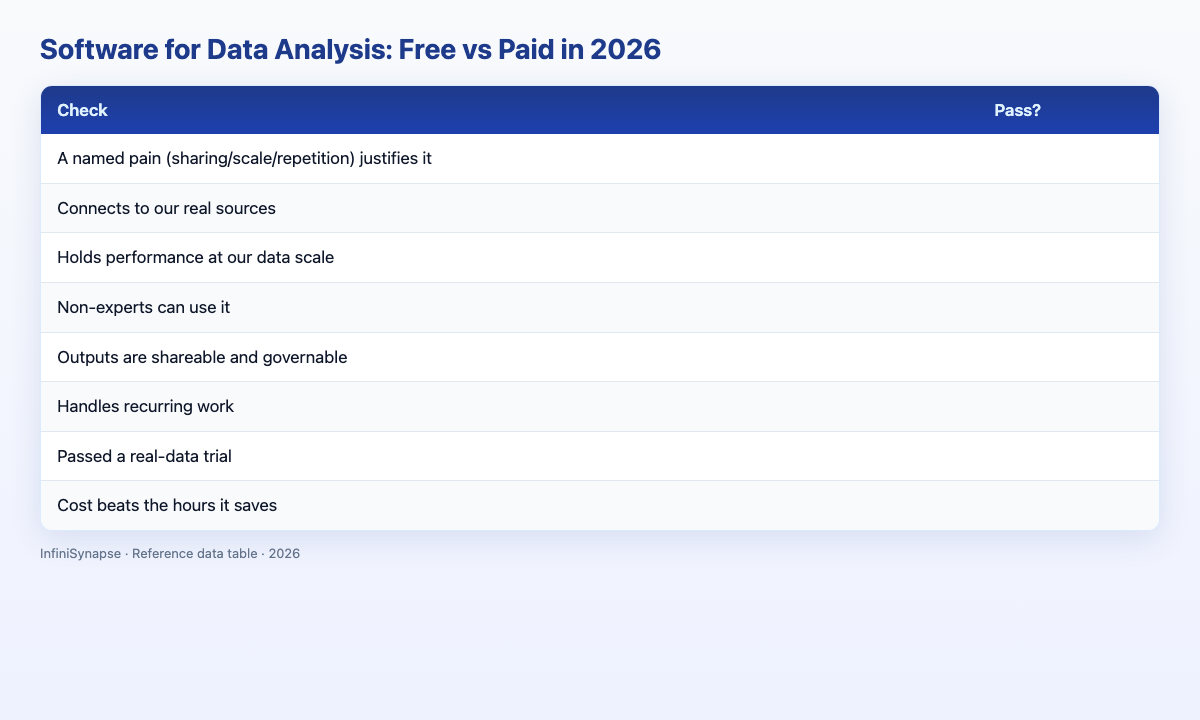
Evaluate any product before buying (1 point each):
| Check | Pass? |
|---|---|
| A named pain (sharing/scale/repetition) justifies it | |
| Connects to our real sources | |
| Holds performance at our data scale | |
| Non-experts can use it | |
| Outputs are shareable and governable | |
| Handles recurring work | |
| Passed a real-data trial | |
| Cost beats the hours it saves |
6–8: buy. 3–5: scope it. Below 3: stay free.
A Two-Week Trial Plan
The safest way to choose software for data analysis is a structured two-week trial rather than a one-hour demo. In week one, connect the tool to a real source and reproduce an analysis you already trust, so you can judge correctness against a known answer. Note every point of friction and tag it as sharing, scale, or repetition—the three pains that justify paying.
In week two, repeat the same analysis and measure how much context you had to re-supply. This is the decisive test, because the recurring case is where legacy tools quietly cost the most. If the second run took a sentence, the tool has real leverage; if it demanded a fresh setup, the license buys less than the demo implied.
Close the trial with a short scorecard filled in by the people who will use the tool day to day, not only the evaluator. Write down, before you start, what result would make you buy and what result would make you walk away. A pre-committed decision rule keeps the trial honest and prevents last-minute rationalization when evaluating software for data analysis candidates.
Common Failure Modes
Failure 1: Paying without a pain. If free covers sharing, scale, and repetition, a license is pure cost.
Failure 2: Buying charts to fix data. Dashboards present; they do not clean.
Failure 3: Demo-data trials. The sample dataset hides real failures.
Failure 4: Ignoring reuse. Cheap software for data analysis that forgets everything is expensive across a year.
Failure 5: Skipping the scorecard. Teams that buy software for data analysis without a pre-committed trial rule often rationalize whichever demo they saw last.
Frequently Asked Questions
Is free analysis software good enough?
For many people, yes. Free software for data analysis—spreadsheets, Python, R, Tableau Public, and AI-native free tiers—covers learning, one-off analysis, and even substantial work. You should only pay when a specific pain (sharing, scale, or repetition) makes free tools genuinely inadequate.
What is the best analysis software?
The best free software for data analysis is a spreadsheet paired with Python or R if you can code. For paid work, Tableau and Power BI lead for shared dashboards; SPSS and SAS suit regulated inferential work. The best pick matches your pain, not the flashiest demo.
When should I pay for analysis software?
Pay when your work triggers two or more of three pains: sharing results with many people, data too large for a spreadsheet, or the same analysis repeated on a schedule. A single pain may justify a targeted tool; two or three usually justify full software for data analysis at the platform level.
Is open-source analysis software reliable?
Yes. Python, R, and their libraries are reliable, widely used, and well documented per Python documentation and CRAN standards. Open-source software for data analysis shifts maintenance to your team, which is why some organizations prefer paid platforms that handle updates for them.
How does AI change analysis software?
AI-native software for data analysis automates recurring, multi-source work that free spreadsheets and manual SQL cannot address efficiently. These tools plan multi-step tasks, expose queries for inspection, and remember finished work—capabilities IBM's augmented analytics overview describes as the direction of commercial analytics products.
Conclusion
Choosing software for data analysis is a disciplined free-versus-paid decision. Start free, log the friction, count the pains, and pay only when sharing, scale, or repetition forces it—then buy the category that removes the pain rather than the tool with the best demo.
If the pain is automation across many sources, an AI-native agent is the direct fix. See how AI-native data analysis works and try the InfiniSynapse web app free on registration, no credit card required.